PvME · Writing for PvME
Intro To Editing
Guide by
PvME
Contributors, from PvME's Git history
- Cris · 4 changes
- Rcm37 · 2 changes
- Trackandxc · 2 changes
- Charlie · 1 change
- Porfet · 1 change
- x222 · 1 change
- Licence
- CC BY-NC-SA 4.0
- Permission
- Why it's hosted here
Matches PvME as of 2026-11-24.

Contributing in its Simplest Form
Making a post in Suggestions (external Discord). Someone else can see that post and turn it into the edit you want to see added to PvME. For example:
⬥ Pointing out typos/rotation changes in guides
⬥ Writing down strategies for a guide that doesn't exist yet
The First Steps of Using PvME's Editor Tools
These are the most commonly used tools that are used by editors who want to be a bit more involved in making their edits happen:
⬥ https://pvme.io/guide-editor/:
• This is the most important tool editors use. It lets them visualise what the text would look like in discord.
• Check out Guide Editor for a tutorial on how to use it, or a youtube video showing off how easy it is to use
• You can load the guide's text content into the guide editor by using the /files command in discord and searching for the guide you want to edit, and clicking on the guide editor link the bot responds with.
⬥ Guide media upload and request (external Discord):
• A simple command /upload is all it takes to turn your picture into a usable link.
What to Edit
Unsure of how you can contribute? Here's some ideas:
⬥ Check out Editing jobs (external Discord) and click the Easy tag at the top of the page as shown here: https://img.pvme.io/images/Fyfjxwn5W3.png
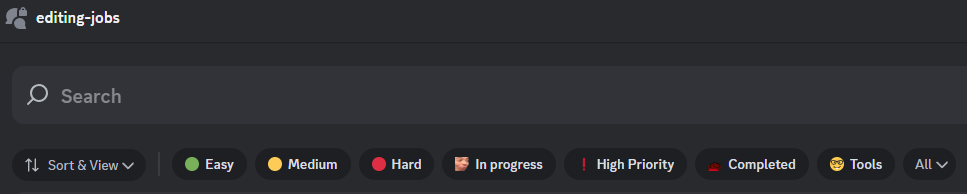
• That should filter the channel to only show jobs that are deemed as easy and open to everyone who wants to help out.
⬥ Finding mistakes in guides as you are reading them to learn a new pvm information for yourself
Asking for Help
Asking your editing questions in Editors chat (external Discord) is never a bad idea, but if you find yourself not getting answered, these are the people to ping:
⬥ Lead Editor
• @chrash.
⬥ Editing Staff
• @ferroric
• @rcm37
• @mionee.
• @tinky1
• @.ndy
• Linie
• @neonx222
• Cris
• @porfy
Next Steps
Once you feel comfortable with this calibre of editing, feel free to dive into Intro To Editing Continued to see some more advanced editing methods and tools.