PvME · Reference
Mobile PvM
Guide credit
PvME
Written and kept up to date by the PvME community.
Everyone with a change to this guide in PvME's Git history, most changes first (35 changes):
- Cris · 8 changes
- Inferium · 5 changes
- Chrash1 · 4 changes
- Ryyhen · 4 changes
- Rcm37 · 3 changes
- 0x0b6e48 · 2 changes
- Crisnyc · 2 changes
- x222 · 2 changes
- 9ɹʎoɹʇsǝpssɐ · 1 change
- Archken · 1 change
- Gamedolf · 1 change
- Jono · 1 change
- Pernix · 1 change
- Siddharth · 1 change
- Tinky1rs · 1 change
- Licence
- CC BY-NC-SA 4.0
- Permission
- Hosted here under CC BY-NC-SA 4.0, the licence PvME publishes. The site owner also says PvME's admins gave permission for wider reuse, in a direct conversation. No written record yet. Record
Every word matches PvME. Checked against the upstream source as of 2026-11-24. Open the source
Introduction
This guide is oriented towards first time mobile users and those looking to set up themselves better to succeed. Once you are set up properly and used to using the mobile interface, all other guides can be roughly followed.
Getting Started
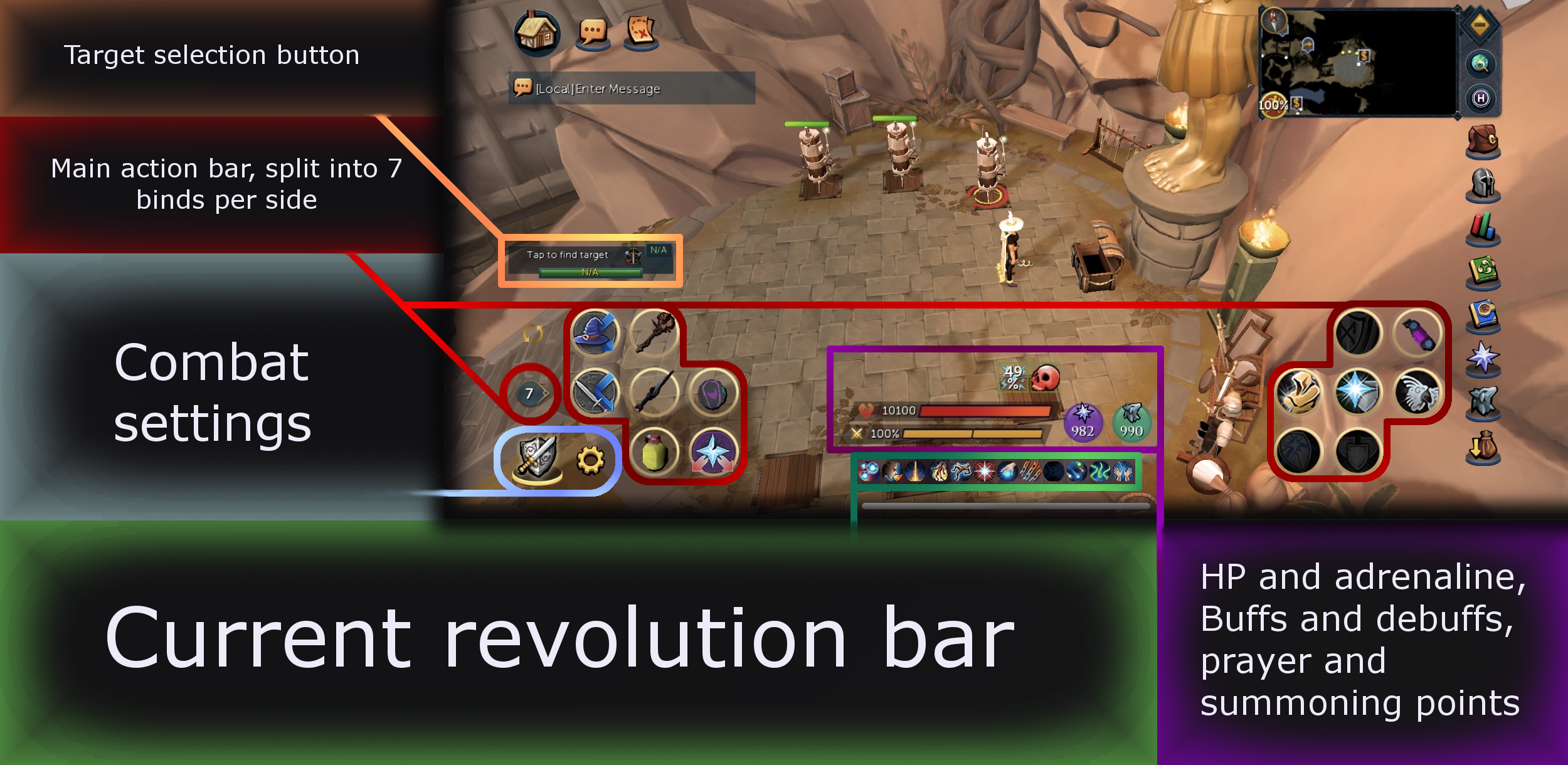
To enter combat mode you simply press the shield and sword icon in the bottom left corner.
Main Action Bar
⬥ This should contain any switches, defensives, food, potions and prayers you will be needing during the fight.
• Omit anything from the bar that is not time sensitive that may be used within a large window.
⬩ Overload, excalibur, elven ritual shard, prayer potions, etc.
⬥ To change your main action bar, press the number on the far left to open a menu to change the Main Action Bar.
⬥ More advanced bosses and rotations may involve using additional bars, this will be covered later.
⬥ Try to keep switches, prayers and food on the left side of this bar so you may open ability books to manually use abilities.
⬥ These are set up in this way so you can open your ability books and manually cast abilities while having access to your prayers, weapons and food.
Revolution Action Bar
⬥ This is a normal revolution bar, you may change the number of slots it uses in combat settings.
⬥ For help making optimal revolution bars:
• Source channel no longer available
⬩ Contains a variety of information on ability damage
• Revolution Damage Calculator - http://rs-revolution.herokuapp.com/bar/
⬩ Helps compare damage on different ability bars
• RuneScape Wiki - https://runescape.wiki/w/Revolution/Bars
⬩ In depth sample revolution bars
Note: You may also choose to use !revo or !revo++ in Bot commands (external Discord) for more examples.
Target Information
⬥ Shows you the information on your current target.
⬥ You may tap this button to Target Cycle to a new target as well.
• For more information on Target Cycle see Mechanics.
Player Status
⬥ Displays your current buffs, debuffs, HP, adrenaline, prayer points and summoning points.
Combat Settings
⬥ Used to enable and disable combat mode.
⬥ Opens menu to select your Main Action Bar.
⬥ This is primarily used to change the contents of your ability bars.
⬥ Long tapping this will lock and unlock your ability bars.
• Allows you to drag and drop items from your inventory and worn equipment onto your ability bar.
Example Ability Bars
Normal Bars
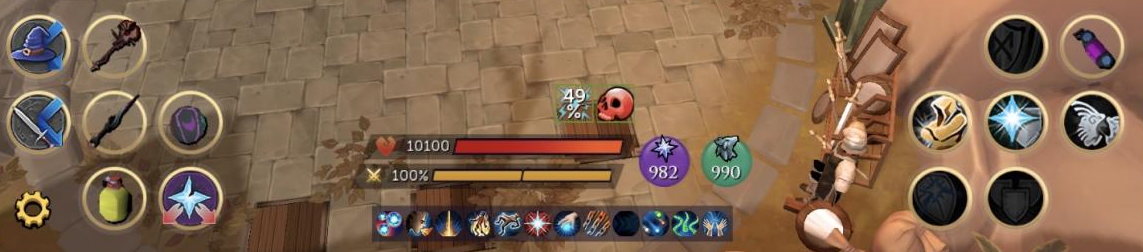
⬥ Revolution Action Bar and Main Action Bar appropriately set up
Specialised Bars
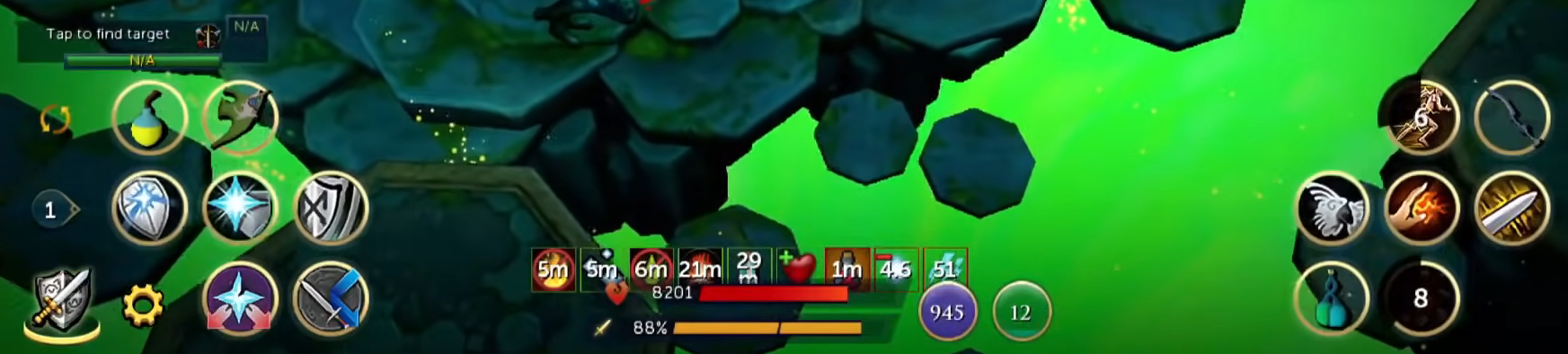
⬥ Revolution Action Bar remains the same and Main action bar has been swapped
• This action bar may be for a specialised dps rotation, to deal with mechanics, etc.
• This normally will include abilities which you would otherwise be unable to cast back to back from ability books.
⬩ An example of this would be  +
 + ability
Content Based Information
Afk Content
Plenty of content is able to be done completely afk, below is a list of some examples of guides of afk content. The mobile client has a slightly larger area loot range and is preferred for afking spread out targets, this may be further extended with the Lorehound pet.
AFK Guides
⬥ Referenced guide unavailable in this snapshot
⬥ Referenced guide unavailable in this snapshot
⬥ AFK Kree Arra (HM)
⬥ Source channel no longer available
Note: This may be outdated. For a full list feel free to use !afkguides in Bot commands (external Discord).
Non-Afk Content
⬥ Require manually inputting defensives, prayer flicking, and weapon switches.
⬥ These bosses may require periods of high damage, lots of prayer flicking and different abilities required on an additional main action bar.
Examples
⬥ Testing and review of a variety of bosses: https://www.youtube.com/watch?v=W8Mq-I3ag68
⬥ 4000% Telos: https://www.youtube.com/watch?v=h2KiASH2wYU